Building an Automated Pentest Report Template with BlackStork #
The final deliverable of a penetration test is the report. Long after the assessment window closes, this document is the main asset the client keeps. It sets the baseline for internal risk management, budget planning, and patching.
Historically, writing this report is a tedious process that relies on manual data collation and wrestling with a word processor. It takes a lot of time and leads to messy formatting. This post shows how to move to a Reporting-as-Code approach, turning report production into reproducible rendering of data-driven templates using BlackStork.
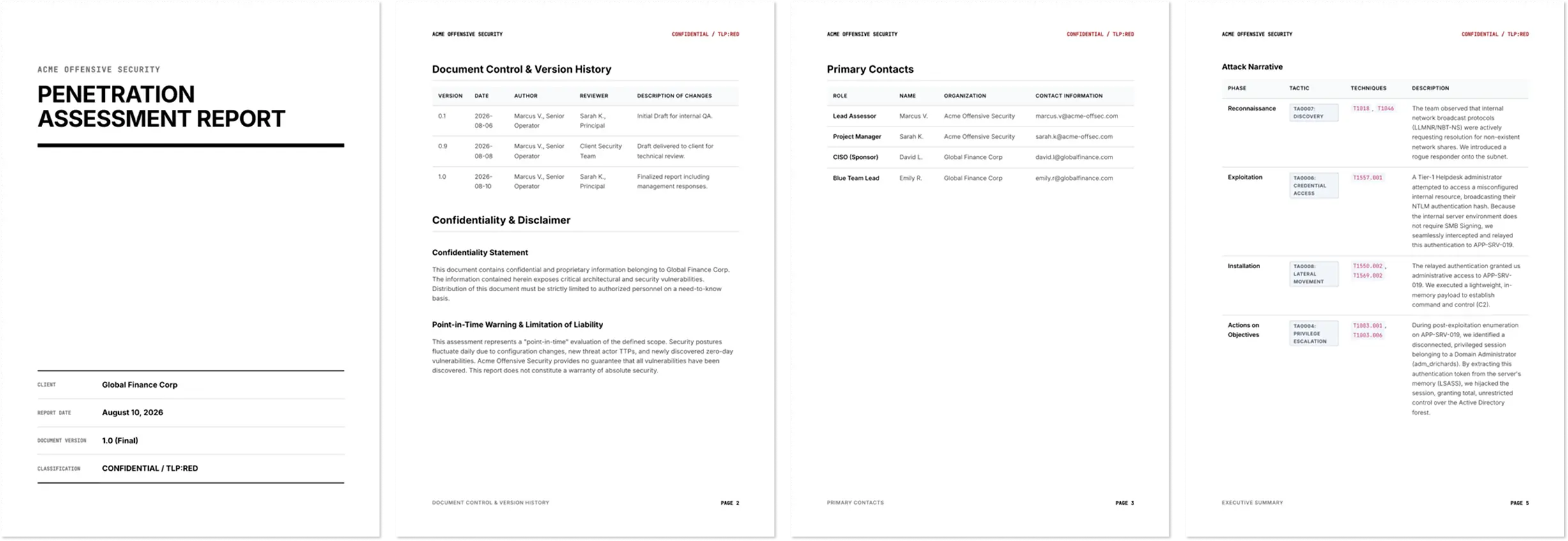
The complete template discussed below is open-source, see Downloads for the links.
You can build and test this template locally using our source-available blackstork-cli tool or in BlackStork SaaS.
What We Are Building #
A solid pentest report speaks to three groups of stakeholders: executives, security managers, and engineers. To give everyone what they need without writing things twice, our BlackStork template is split into four core parts.
Here is the outline of the deliverable we are building today:
- The Executive Summary - a high-level business narrative driven by structured data, removing the friction of writing boilerplate.
- The Attack Narrative - a step-by-step mapping of the kill chain used during the test to show the real environmental risk.
- Detailed Technical Findings - a structured breakdown of individual vulnerabilities based on the OPTRS schema, ready for engineering action.
- The Remediation Roadmap - prioritized fixes categorized by the effort required to implement them.
Below, we will look at how to manage the underlying data for this structure and map these four components into BlackStork’s template language.
Vendor-Agnostic Data Model & Context #
Technical evidence decays fast after a test ends. Unstructured notes and loose screenshots make the drafting phase harder and often lead to vague findings.
The industry tried to fix this by moving to structured data models, like the OWASP Penetration Test Report Standard (OPTRS). Modern offensive tools can export to OPTRS JSON, which makes automation easier. However, OPTRS has a glaring limitation: it is a flat schema. It is good for cataloging point-in-time vulnerabilities, but it completely fails at modeling relationships or capturing the consultant’s actual analysis. If you chain a low-severity misconfiguration to a medium-severity exploit, a flat list of OPTRS vulnerabilities cannot capture that sequence or your judgment on the overall risk.
Commercial reporting platforms attempt to solve this by forcing your data into proprietary web interfaces. These “walled gardens” pull engineers out of their native workflows (CLI, GitOps, CI/CD) and lock assessment data into closed databases.
Breaking down these walled gardens requires a data model that bridges the gap between the raw data machines need and the clear story humans need. To achieve this, our BlackStork template combines two datasets.
We split the data into two distinct layers:
- The base layer (machine data) - a strict, schema-compliant OPTRS JSON file, fetched dynamically from an external API or file system. This contains the raw vulnerability data (CVSS scores, affected assets, finding IDs).
- The context layer (human analysis) - a custom, STIX2-inspired dataset provided directly by the assessor. Because OPTRS cannot capture the “so what” of an engagement, the human consultant provides the narrative context: the attack kill-chain, specific out-of-scope constraints, strategic remediation timelines, and step-by-step proof-of-concept evidence.
By combining the vulnerability data of OPTRS with human-driven context, we build a data model that captures the full assessment.
Here is how this architecture looks in the document template:
# Load base OPTRS data dynamically.
# Here we fetch static JSON but in production we would query an external API.

data http base {
  url = "https://gist.githubusercontent.com/traut/acf3a510399d749764bd9f18be5586e5/raw/e6a3c151a24765de4ab4ca47b2edfb078805de17/pentest-report.optrs.json"
  response_mime_type = "application/json"
}

vars {
  # Extend PTRS data with human-driven context and narratives

  context = {
    classification = "CONFIDENTIAL / TLP:RED"

    # Tracking document lifecycle and peer review
    document_control = [
        ...
    ]

    out_of_scope = "Production financial transaction databases (`10.52.0.0/16`), Physical security, and DoS attacks."

    overview_data = {
      scenario        = "Assumed Breach (standard employee workstation)"
      time_to_admin   = "4 hours"
      confidence      = "High"
    }

    # STIX2-inspired attack narrative mapping the exact kill chain
    attack_narrative = [
      {
        kill_chain_phase = "Reconnaissance"
        tactic           = "TA0007: Discovery"
        techniques       = ["T1018", "T1046"]
        text             = "The team observed that internal network broadcast protocols (LLMNR/NBT-NS) were actively requesting resolution for non-existent network shares. We introduced a rogue responder onto the subnet."
      },
      {
        kill_chain_phase = "Exploitation"
        tactic           = "TA0006: Credential Access"
        techniques       = ["T1557.001"]
        text             = "A Tier-1 administrator attempted to access a misconfigured internal resource... we seamlessly intercepted and relayed this authentication to APP-SRV-019."
      }
      # Subsequent phases (Lateral Movement, Privilege Escalation) follow...
    ]

    # Prioritized remediation roadmap
    courses_of_action = [
        ...
    ]

    # Appending crucial engagement data PTRS ignores
    appendices = {
      password_analysis = {
        context        = "Upon dumping the `NTDS.dit` database via DCSync, the team performed a localized, offline cracking exercise..."
        time_spent     = "4 hours (8x RTX 4090 rig)"
        hashes_cracked = "412 (28.3% of total accounts)"
        observations = [
          { name = "Season/Year Patterns", details = "145 accounts utilized a variant of the current season and year (e.g., `Summer2026!`)." }
        ]
      }
      # Post-engagement cleanup tracking follows...
    }

    # Contextual overrides for specific PTRS findings
    finding_overrides = {
      "INT-01" = {
        evidence = [
          ...
        ]
      }
    }
  }
}
This architecture is incredibly powerful. By injecting human context (document control, specific methodologies, formatted code blocks, and password analysis) we elevate the report from a dry vulnerability scan into a highly readable, consultative document.
Simultaneously, by utilizing JQ queries to merge this human context directly into the underlying OPTRS schema at render time, BlackStork makes sure the final data structure remains consistent, parsable, and strictly decoupled from the presentation layout. You manage your findings using the tools you already know, and the engine handles the data collation natively.
Why Prompting Isn’t Reporting #
At this point, a natural question arises: If we are moving toward automation, why bother writing HCL templates? Can’t I just throw my raw vulnerability data at an LLM and prompt it to write the report?
It might work somewhat but it’s not a reliable solution (at the time of writing).
LLMs have distinct strengths and weaknesses. They are exceptional at parsing context and summarizing prose. They are fundamentally poor at producing deterministic, strictly formatted, and flawlessly factual outputs. A commercial penetration test report is a high-stakes document; it must be technically exact.
If you attempt to generate an entire report with an LLM, it will occasionally hallucinate a CVSS vector, drop a critical remediation step, or completely break the document’s layout. The editorial oversight required to proofread the facts and fix the styling of a purely AI-generated report will quickly negate any time you thought you saved.
BlackStork takes a pragmatic approach, combining the best of both worlds. We embrace the utility of LLMs, but we confine them to what they do best: writing prose. By using predefined, strict HCL templates for the layout and factual data, and isolated LLM blocks for boilerplate descriptions, you achieve high automation without sacrificing the high quality and determinism required by enterprise clients.
Structuring the Report #
With the data structure established and the presentation boundaries set, we can map the four core components of our blueprint directly into modular template blocks.
1. The Executive Summary #
Executives care about business risk over technical specifics. The summary needs to translate technical data into operational impact.
To eliminate the friction of writing boilerplate, this template uses BlackStork’s native LLM text generation block. However, we must establish a firm baseline here: clients do not pay for AI-generated opinions; they pay for your technical expertise and analysis. The author of the report should never rely on an LLM for conclusions.
The LLM’s only job is to take the consultant’s structured judgment (captured in our data in the extension block) and turn it into readable paragraphs.
section {
  title = "Assessment Overview"

  content llm_text "exec_overview" {
      prompt = <<-EOT
        You are a seasoned Principal Security Consultant writing the
        "Assessment Overview" section of an executive penetration test
        report.

        Your target audience consists of C-Suite executives (CEO, CISO, CTO)
        and the Board of Directors.

        Write a concise, authoritative, and objective two-to-three paragraph
        executive summary.

        Do NOT include greetings, titles, bullet points, or sign-offs. Focus
        strictly on business risk, structural security posture, and the
        overarching narrative.

        Use the following data from the engagement to construct the narrative:

        # Engagement Context
        - Client: {{ .data.http.base.report_metadata.tester_info.company }}
        - Assessor: {{ .data.http.base.report_metadata.tester_info.company }}

        ...
    EOT
  }
}
2. The Attack Narrative #
Individual vulnerabilities rarely exist on their own. Showing a list of medium-severity findings does not communicate the real risk unless you document how they are chained together.
Using our STIX2-inspired data model, the attack narrative outlines the kill chain steps with the phase, MITRE ATT&CK tactic and techniques:
section {

  title = "Attack Narrative"

  content table "attack_narrative" {
    columns = [
      { header = "Phase", value = "**{{ .row.value.kill_chain_phase }}**" },
      { header = "Tactic", value = "{{ .row.value.tactic }}" },
      { header = "Techniques", value = "{{ .row.value.formatted_techniques }}" },
      { header = "Description", value = "{{ .row.value.text }}" }
    ]
    rows = query_jq(<<-EOT
      .vars.context.attack_narrative |
      map(. + { formatted_techniques: (.techniques | map("`" + . + "`") | join(", ")) })
    EOT
    )
  }

}
3. Detailed Technical Findings #
Technical findings need to be clear so the client’s engineering teams can act on them immediately. Ambiguity here slows down remediation.
To keep the format consistent across all findings, we build a reusable block
(section "pentest_finding_details") and iterate over the OPTRS vulnerabilities
array.
section "pentesting_finding_details" {
  title = "{{ if .vars.dynamic_item.id }}{{ .vars.dynamic_item.id }}: {{ end }}{{ .vars.dynamic_item.title }}"

  content list "finding_meta" {
    items = [
      { label: "Finding ID", value: query_jq(".vars.dynamic_item.id") },
      {
        label: "Severity",
        value: query_jq(".vars.dynamic_item.severity"),
        cvss_base: query_jq(".vars.dynamic_item.cvss_score | tostring"),
        cvss_vector: query_jq(".vars.dynamic_item.cvss_vector")
      },
      { label: "Status", value: query_jq(".vars.dynamic_item.status") },
      { label: "Affected Assets", assets: query_jq(".vars.dynamic_item.affected_assets") },
    ]
    item_template = <<-EOT
      **{{ .label }}:**
      {{- if eq .label "Severity" }} **{{ upper .value }}** (CVSS v3.1: {{ .cvss_base }} - {{ .cvss_vector }})
      {{- else if eq .label "Affected Assets" }} {{ .assets | quote | join ", " | replace "\"" "`" }}
      {{- else }} {{ .value }}
      {{- end }}
    EOT
  }

  # Subsequent template blocks for Description, Proof of Concept, Impact, and Remediation...
}
This design centralizes your presentation rules. If you adjust a layout constraint in the template, it automatically updates across all findings. This removes formatting busywork and reduces QA time before delivery.
4. The Remediation Roadmap #
Remediation guidance requires an understanding of enterprise IT limits, like change-freeze schedules and legacy dependencies. Organizing the roadmap by implementation effort helps the client prioritize the work:
- Tactical (0-30 days): high-impact, low-friction configuration changes (e.g., disabling LLMNR via Group Policy).
- Operational (30-90 days): broader deployments that require QA testing (e.g., enforcing LDAP Channel Binding).
- Strategic (90+ days): architectural shifts (e.g., implementing an Active Directory Tiering model).
HTML/CSS-powered Presentation Layer #
Getting the data and structuring the content is only half the battle. The other half is ensuring the final document adheres to strict branding guidelines without introducing formatting artifacts. Anyone who has written a pentest report has wasted hours fighting a word processor over margins, table alignment, and rogue page breaks.
Formatting must be flexible enough to accommodate how the client actually consumes the report. For many, the traditional A4 Portrait layout is obsolete - in environments dominated by widescreen monitors, screen sharing on video calls, and boardroom presentations, a landscape, presentation-deck layout is far more effective. However, other clients still require a classic, print-ready portrait document. A mature reporting pipeline must easily accommodate either preference.
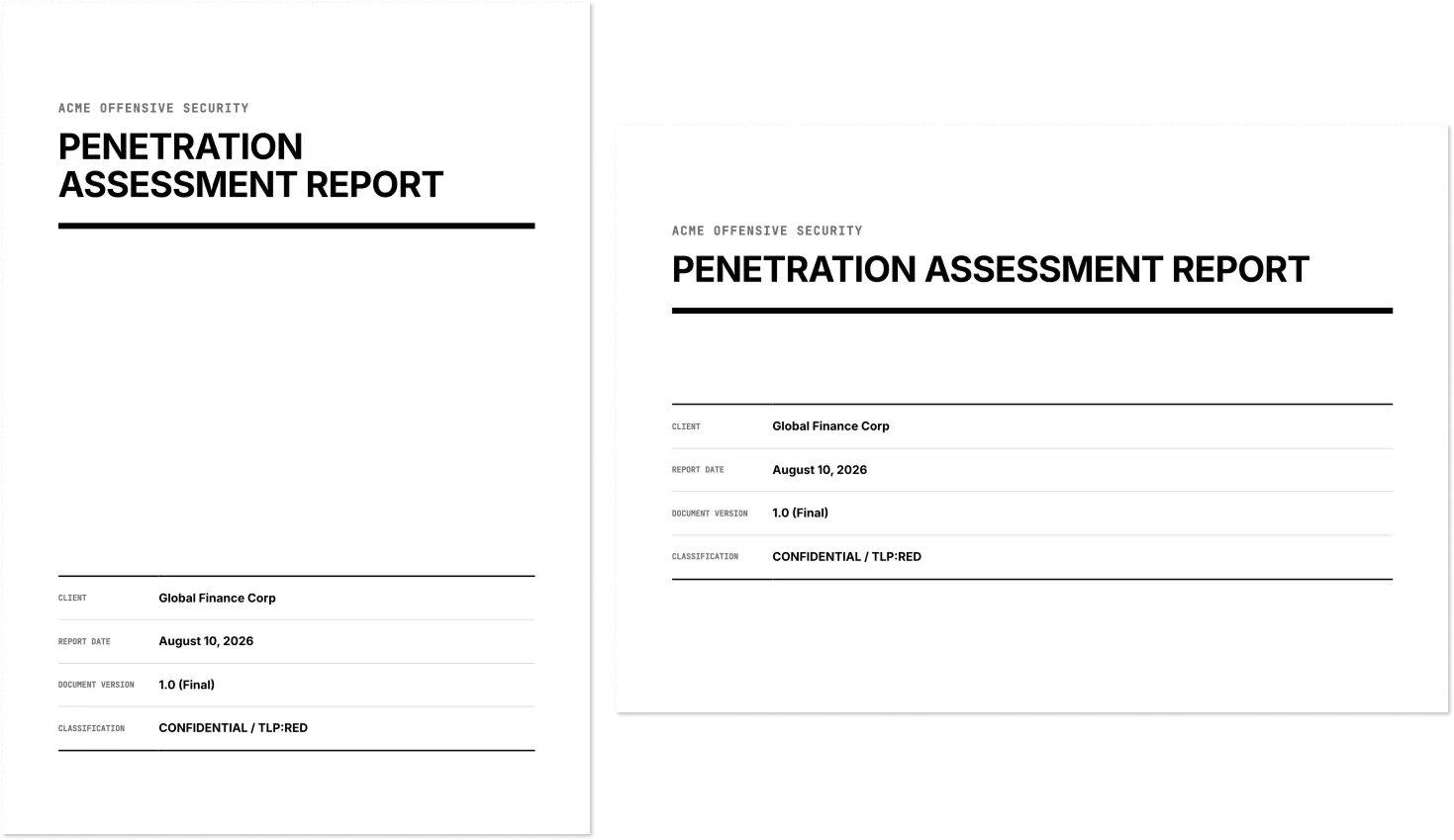
Because BlackStork uses HTML and CSS under the hood for document formatting, treating the report layout as a web rendering problem becomes the most powerful option for structural control. You are no longer fighting a word processor’s rigid internal logic, you are building an HTML and CSS layout. Switching an entire template from portrait to landscape, adjusting the grid, or updating corporate styling does not require manually reformatting 50 pages of text. You define the rules once in code, and the engine handles the rest.
Supporting the Client Workflow #
A PDF report is a presentation format and it is notoriously difficult for machines to parse. If your client wants to track work or feed your findings into their own tools, a PDF creates friction.
Because this workflow is built on open data structures, BlackStork allows you to deliver more than just a locked document.
First, BlackStork SaaS persists your structured input data alongside the rendered document. This means you can hand over the raw JSON or YAML file right alongside the final PDF. The client’s security operations team can download this structured data and run internal scripts over it, ingesting data into their systems.
Second, BlackStork provides Markdown formatting for reports out of the box. As organizations increasingly rely on internal LLMs to query and summarize threat intelligence, handing them a PDF creates a bottleneck. By downloading the report as a clean Markdown file, you support the customer’s LLM workflows natively. They can feed the Markdown directly into their systems—no need for them to write or maintain fragile PDF parsing scripts.
You deliver a clear document for human review, and clean, structured data for their machines.
Downloads #
Standardizing your data and automating the presentation allows you to build consistent reports while spending more time on the actual technical assessment.
To help you implement this workflow, we have open-sourced the templates:
Templates #
- Pentest Report BlackStork Template - the data-driven template discussed in this post, available in our Community Repository.
- HTML Format Template - HTML format template for rendering the document template as HTML page.
- PDF Format Template - PDF format template for rendering the document template as PDF (only supported in BlackStork SaaS).
Output Examples #
Because of strict separation of data from the presentation layer, the exact same input data can be compiled into different layouts without altering the source content.
- Report as HTML - the native, web-accessible output.
- Report as A4 Portrait PDF - the classic, print-ready document layout.
- Report as A4 Landscape PDF - the presentation-optimized layout designed for widescreen monitors, wide tables, and raw command outputs.
- OPTRS data - mock OPTRS data used to render the reports.
Next Steps #
To compile this template with your own assessment data:
- Use our source-available blackstork-cli. You can compile your data and format your content directly from your terminal.
- To generate PDFs, tell me about an assessment report you produce or email me. BlackStork SaaS provides a managed experience for template management, document editing, formatting, and sharing.
- Join the discussion on BlackStork Community Slack. It is the place for asking question on how to get started with
blackstork-clior how to adapt community templates for your team’s specific reporting needs.